OIMG
OIMG is a desktop application that helps you optimize your images using modern image formats.
Background
It is estimated that there are 20 trillion images on this earth (as of 2026), taking up an estimated 50 of storage.
Motivation
There are 3 main reasons why I built OIMG:
There are great modern out there that achieve … but most people, including me, don’t use them.
*¹ Generally:
 - JPEG-XL in lossless mode saves ~30% vs. PNG,
 - AVIF/JPEG-XL can save 50~80% from JPEG with visually imperceptible quality
Even if someone wanted to use these state-of-the-art codecs, there isn’t a “nice” way to do it e.g., something other than a command-line program requiring a long command every time.
- Since these codecs are usually in the form of C++ libraries, it’s not straightforward to install
- You could totally do it with image editors like GIMP, but it’s not suitable for batch conversion (e.g., converting an entire folder)
A problem with using CLI to compress images is that it is not trivial to ensure it meets the quality threshold you are targeting.
- This is especially true for JPEG, where setting quality parameter around 30~70 sometimes yields completely acceptable results for certain images (typically with many high-frequency features, like tree leaves), and unacceptable for others (typically with important low-frequency features, like the sky, that produce noticeable banding{hover: like this})
- Perhaps this is something fundamental: CLI is a text-based, not visual, interface… and images are a visual medium.
Formulation
To me, the ideal image compression program would:
- Be easy to use—simplifying the workflow to a few clicks
- Contain the latest and greatest codecs, obviously!
- Show the “diff” between original to allow inspection, to allow users to conveniently explore different quality parameters
- Even better, suggest optimal parameter values itself or provide some hints on the quality (so users don’t have to squint their eyes every time)
- Have nice UX in general (buttons in the right places, intuitive hotkeys, sensible defaults, multithreaded by default, …)
And so OIMG was designed to check all these boxes.
Features
Simplicity
OIMG was designed to be simple to use, and simple to understand.
Using OIMG from Finder
Error Visualization
OIMG shows the “diff” between the original image and the optimized image.
Built-in IQA
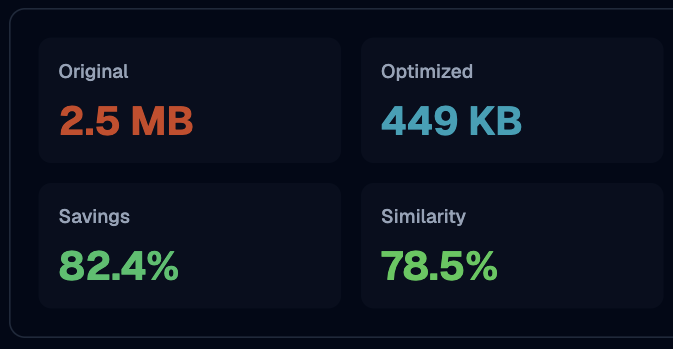
OIMG bundles industry-standard image quality analysis (IQA) algorithms and computes them immediately, once you choose the optimization parameters.

Quality Sweep
In most images, there is a
provide relevant information in an easy-to-digest way.
- Extra extra: I wanted to explore the idea of “transpiling”{hover: not the right use of this word, but anyway}:
- The primary cause behind slow adoption of modern codecs is compatibility